3D View Color Scale Title Properties
The Title page contains the properties of the title for the 3D view individual color scale. Click once on the individual Color Scale in the 3D view Contents window to change the properties of the title of the color scale on the 3D map.
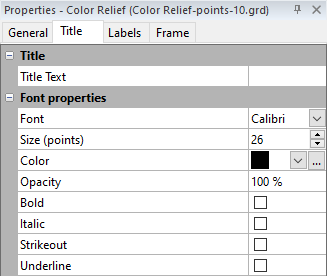
|
| Edit the properties of the color scale title on the Title page of the Properties window. |
Text
The Text section adds a title for the color scale. Click in the box next to Text and type the title exactly as you want the text to appear above the color scale.
Font Properties
Set the font properties for the color scale labels in the Font properties section.
See Also
General Properties - 3D View Color Scale