Layer Properties
The Layer page in the Properties window for a base, post, Post (Classed), grid values, contour, color relief, vector, peaks and depressions, point cloud, watershed, , viewshed, or graticule controls the opacity of the entire map layer. Surface maps do not have a Layer page.
|
|
|
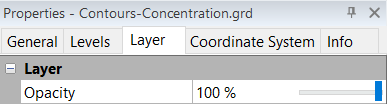
Adjust the Opacity of the entire layer on the Layer page. This example shows the Layer page of a contour map in the Properties window. |
Opacity
Change the opacity of the entire layer by entering an Opacity value from 0% (completely transparent) to 100% (completely opaque). Alternatively, click and drag the  to change the opacity percentage.
surface maps do not have the ability to change the opacity for the entire map.